Software
Best field service management software for small businesses
Quick answer
For a small trade business, compare Jobber (from $49/mo), Housecall Pro (from $79/mo), ServiceM8 (free for 30 jobs a month), Kickserv ($60/mo for five users) and Workiz (price on request). The best fit depends on team size, jobs per month, accounting sync and recurring work.
On this page
- What field service software does
- Do you need it yet?
- What it is worth: a quick calculation
- Questions to ask before you sign
- Five tools and how they price
- What a three-person crew would pay
- How to choose
- The costs that are not on the plan price
- Getting the crew to use it
- Use the free trial properly
- What to do next
Picture the system most small trade businesses start with: a paper diary, a whiteboard in the garage, quotes typed in a word processor, invoices chased by text message and a crew who call to ask where they are going next. It works with five customers. With fifty, jobs get double-booked, quotes go out late and invoices are forgotten.
Field service management software puts scheduling, quotes, invoices, payments and customer messages in one place. This guide explains what that software does, when it is worth paying for, how five well-known tools price their plans, and how to choose one for a small crew. Every price below comes from the company's own pricing page, checked on November 4, 2026. Prices change often, so check the current page before you buy.
We have no commercial relationship with any of these companies, and this guide contains no affiliate links.
What field service software does
Most tools in this category cover the same core jobs:
- Scheduling and dispatch. A calendar for every person, with jobs dragged into place and sent to the crew's phones.
- Quotes and invoices. Professional documents built from a price list, sent by email or text, and turned into invoices when the job is done.
- Payments. Customers pay online by card or bank transfer, and you see who has paid.
- Customer records. Addresses, notes, photos and job history in one place.
- Reminders and follow-ups. Automatic messages before the visit and after a quote goes unanswered.
- A crew app. Job details, checklists and photos on each worker's phone.
The differences are in the details: how many users each plan includes, whether it syncs with your accounting, how it handles recurring work, and what it charges for payments and add-ons.
Do you need it yet?
Not every business does. A good test is time and mistakes:
- You spend more than two or three hours a week on scheduling, quotes and invoices.
- Jobs have been double-booked or forgotten more than once.
- Invoices go out days after the work is done.
- You have, or are about to hire, someone who needs job details on their phone.
If two or more are true, the software will probably pay for itself in saved time and faster payments. If none is, a shared calendar and a good invoice template may be enough for now.
What it is worth: a quick calculation
Here is a simple way to check whether a plan pays for itself. The figures are an example; use your own.
| Line | How it is worked out | Per month |
|---|---|---|
| Admin time saved | 3 hours a week × 4.33 weeks × $35 an hour | $455 |
| Invoices paid sooner | One extra job a month that used to slip through | $250 |
| Value | $705 | |
| Software cost | A team plan around $150 to $200 | $150 to $200 |
The $35 is what an hour of your own time is worth to the business, and the extra job stands for the quotes that went cold because nobody followed up. If your numbers come out well above the plan price, the decision is easy. If they come out close, a cheaper plan or a free plan may be the better start.
Questions to ask before you sign
Every pricing page leaves something out. Before you commit to a year, ask each company:
- What are your card and bank payment rates, and is there a monthly fee for payments?
- How do I export my customers, jobs and invoices if I leave, and in what format?
- What happens to the price at renewal, and how much notice do you give of increases?
- What support is included on my plan: phone, chat or email, and at what hours?
- Does the crew app work without a signal, for basements and rural jobs?
- Which features in the trial are not in the plan I am buying?
Write the answers down. They are part of the price as much as the monthly fee.
Five tools and how they price
| Tool | Entry plan, billed monthly | Users on entry plan | Free plan or trial | Pricing model |
|---|---|---|---|---|
| Jobber | Core, $49/mo | 1 | 14-day trial | Plans by features and team size |
| Housecall Pro | Basic, $79/mo | 1 | 14-day trial | Plans by features and team size |
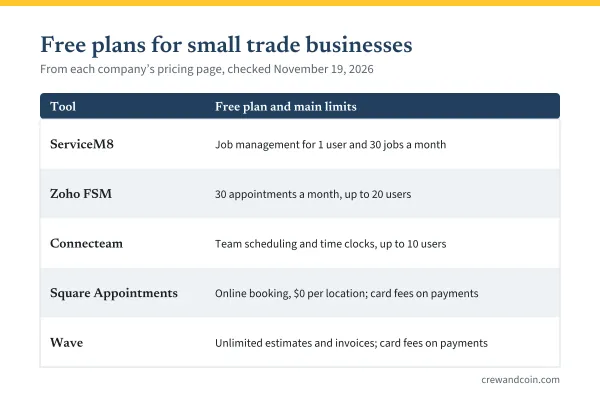
| ServiceM8 | Free, $0 | 1 | Free plan (30 jobs a month) | Plans by jobs per month |
| Kickserv | Start, $60/mo | 5 | 30-day trial | Plans by features and team size |
| Workiz | Not published | Not published | 7-day trial | Price on request |

Jobber
Jobber's Core plan costs $49 a month without commitment, $39 a month with a one-year commitment, or $29 a month billed annually, for one user. Connect, Grow and Plus add automation, QuickBooks Online sync, job costing, two-way texting and more, with prices that rise with team size. Extra users cost $29 a month each. The 14-day trial gives full access to the Grow plan, with no credit card required. The details are in the guide to Jobber pricing.
Housecall Pro
Housecall Pro's Basic plan costs $79 a month, or $59 a month billed annually, for one user. Essentials includes five users and adds QuickBooks Online sync, routes and employee GPS tracking; Max includes eight users and adds recurring service plans and route optimization. On Max, extra users cost $35 a month. Its pricing page lists card processing from 2.59 percent and a 1 percent fee on bank payments. The trial lasts 14 days on the Max plan, with no card required.
ServiceM8
ServiceM8 prices by the number of jobs, not by users. The Free plan covers 30 jobs a month for one user. Paid plans include unlimited users: Starter is $29 a month for 50 jobs, Growing $79 for 150, Premium $149 for 500, and Premium Plus $349 for 1,500 or more. For a crew with many people and a moderate number of jobs, that model can work out cheaper than per-user pricing.
Kickserv
Kickserv's Start plan costs $60 a month and includes five users, which is unusual at that price. Run costs $119 for ten users and adds dispatch mapping and GPS check-ins; Scale costs $199 for twenty users. Its pricing page says an annual subscription saves 20 percent, and the free trial lasts 30 days. QuickBooks Online integration is included from the Start plan.
Workiz
Workiz does not publish prices; each plan shows a "request pricing" button. Its pricing page lists three plans, Standard, Pro and Ultimate, and a seven-day free trial with no card required. Standard includes scheduling, estimates, invoices, online payments and QuickBooks integration; Ultimate adds service plans, inventory and flat-rate pricing.
What a three-person crew would pay
Plans are built differently, so the closest like-for-like comparison is the cheapest plan that covers three users, billed monthly:
| Tool | Plan that covers three users | Monthly price |
|---|---|---|
| Jobber | Connect, up to 5 users | $199 |
| Housecall Pro | Essentials, 5 users | $189 |
| ServiceM8 | Growing, unlimited users, 150 jobs a month | $79 |
| Kickserv | Start, 5 users | $60 |
| Workiz | On request | Not published |
These plans do not include the same features, so treat the table as a starting point, not a verdict. A crew that needs two-way texting, job costing or route optimization may need a higher plan with some tools. Annual billing lowers most of these prices.
How to choose
Start from how your business works, not from the feature list:
- Working alone with a modest number of jobs? ServiceM8's free plan, Jobber Core or Housecall Pro Basic are the natural starting points. The guide to free field service software compares the free plans.
- Running a cleaning company? Tools built for cleaning are compared in the guide to cleaning business software.
- A crew of three to five? Compare per-user plans like Kickserv Start and Jobber Connect with per-job pricing like ServiceM8. The right answer depends on how many jobs you do each month.
- QuickBooks Online is your accounting system? Check which plan includes the sync: Jobber from Connect, Housecall Pro from Essentials, Kickserv from Start, and Workiz from Standard.
- Recurring maintenance contracts? Look for service plans or recurring jobs: Housecall Pro lists recurring service plans on Max, and Workiz lists service plans on Ultimate.
The costs that are not on the plan price
- Payment processing. Every tool that takes card payments charges for them. Jobber's pricing page lists card processing at 2.9 percent plus 30 cents; Housecall Pro lists card processing from 2.59 percent. Ask the others for their rates before you compare.
- Add-ons. Jobber lists an AI receptionist at $29 a month, Pipeline at $49 and a marketing suite at $99, sold separately.
- Extra users. $29 a month each on Jobber; $35 on Housecall Pro's Max plan.
- Commitment. The lowest prices usually require a year's commitment or annual payment upfront.
- Your time. Setting up price lists, customers and templates takes days. Budget for it.
The software is overhead, like the van and the insurance. The complete pricing guide shows how to spread it across your billable hours.
Getting the crew to use it
Software only saves time if everyone uses it. A mistake a lot of owners make is buying the tool, loading it with data and then letting the crew carry on with phone calls and paper notes. A few habits make the switch stick:
- Start with one thing. In the first two weeks, ask the crew only to check their day in the app and mark jobs complete. Add photos and checklists once that is routine.
- Stop the old channel. If job details still arrive by text message, the app becomes optional. Send them through the app only.
- Show what is in it for them. Directions, gate codes and customer notes in one place save the crew calls and wasted trips.
- Check the data weekly. Ten minutes on Friday to tidy jobs and invoices keeps the reports worth reading.
Use the free trial properly
A trial is only useful if you test real work. In the first week:
- Load your ten most common services with your real prices.
- Enter ten real customers and schedule a real week.
- Send a real quote and turn it into an invoice.
- Take one real payment and see what the fee is.
- Put the app on a crew member's phone and ask them to use it for a day.
- Ask how you would export your customers and history if you left.
If the tool still feels right after that week, it probably is. If you are already choosing between the two best-known names, the guide to Jobber vs Housecall Pro compares them plan by plan.
What to do next
Write down your team size, your jobs per month and the three features you cannot do without. Then shortlist two tools from the table, run both trials with real work in the same week, and compare what each would cost at your size. If you are still setting up the business itself, the guide to starting a home service business covers the steps before software.
Frequently asked questions
What is the best field service software for a small business?
It depends on team size, jobs per month and the features you need. Solo operators often start with a free or entry plan; crews should compare per-user plans with per-job pricing at their real size.
Is there free field service management software?
ServiceM8 has a free plan for one user and 30 jobs a month. Most other tools offer free trials of 7 to 30 days instead of a free plan.
How much does field service software cost for a small crew?
Based on published prices checked in November 2026, the cheapest plan covering three users ranged from $60 a month (Kickserv Start) to $199 a month (Jobber Connect) when billed monthly, before payment fees and add-ons.

