
Software
Software for cleaning businesses compared
Quick answer
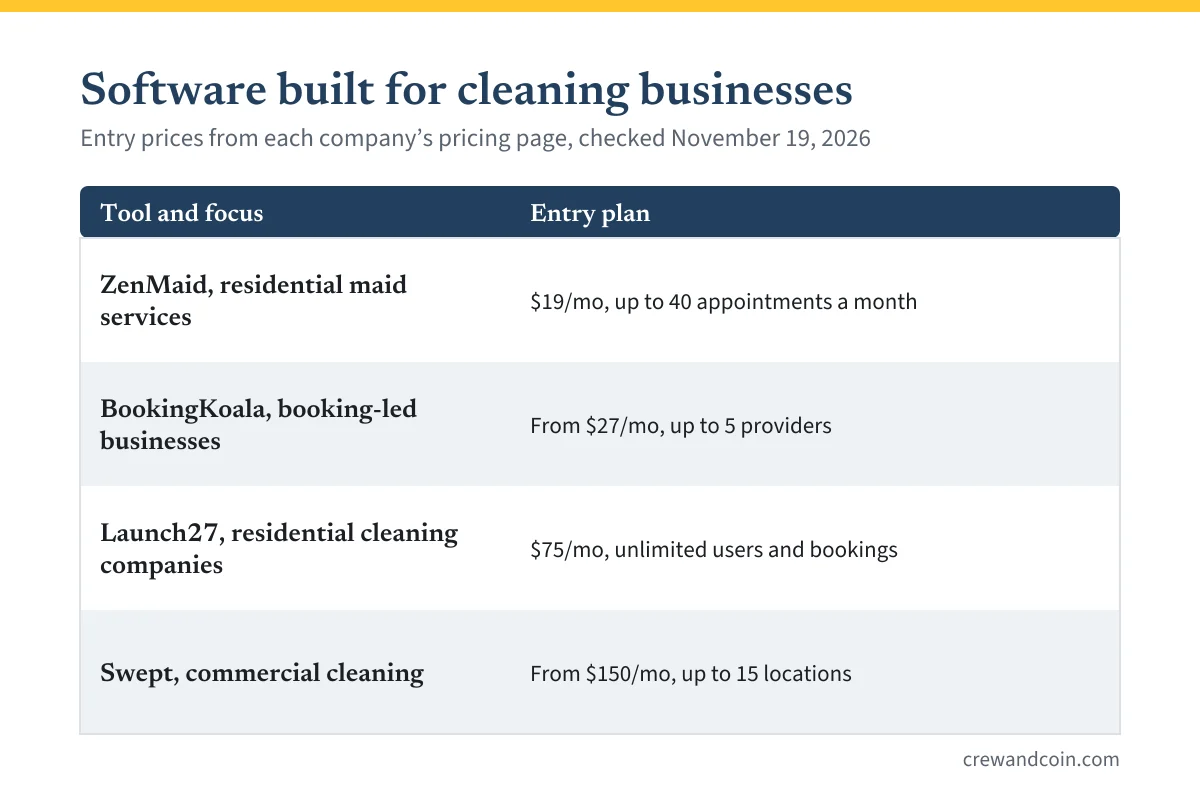
For residential cleaning, compare ZenMaid (from $19/mo), BookingKoala (from $27/mo) and Launch27 (from $75/mo); for commercial cleaning across sites, Swept (from $150/mo). If you also offer other services, a general tool like Jobber or Housecall Pro may fit better.
A cleaning business runs on repetition: the same homes every week or two, the same checklist in every kitchen, the same cleaners driving the same routes. General field service software can handle that, but a group of tools is built specifically for cleaning companies, with online booking forms, recurring schedules, cleaner apps and payroll built in.
This guide compares the cleaning-specific tools with the general ones, on what each company publishes on its own pricing page, checked on November 19, 2026. We have not tested these tools, we have no commercial relationship with any of them and there are no affiliate links here. Prices change, so check the current page before you sign up.
Residential or commercial first
The right tool depends on which kind of cleaning you do, because the two work differently, as the guide to starting a cleaning business explains:
- Residential cleaning needs online booking, recurring visits every week or two, reminders, card payments and simple cleaner schedules.
- Commercial cleaning needs per-location checklists, clock-in and clock-out at each site, inspections and shift management, and usually invoicing per client rather than per visit.
Cleaning-specific tools compared
| Tool | Built for | Entry price | Trial |
|---|---|---|---|
| ZenMaid | Residential, maid services | $19/mo, up to 40 appointments a month | 14 days |
| BookingKoala | Booking-led service businesses | From $27/mo, up to 5 providers | 14 days |
| Launch27 | Residential cleaning companies | $75/mo, unlimited users and bookings | 14 days |
| Swept | Commercial cleaning | From $150/mo, up to 15 locations | Demo; no trial shown |
ZenMaid
ZenMaid is built for maid services. Its Starter plan costs $19 a month for up to 40 appointments a month, with online payments and invoicing. Pro, at $39 a month, removes the appointment limit and adds digital checklists, a cleaner app with GPS tracking, booking forms for your website, reports, payroll and QuickBooks integration. Pro Max, at $49, adds cleaner availability and time-off tracking, data export and booking forms with your own branding. ZenMaid's page says text-message charges are not included in any plan, and offers a 14-day free trial.
BookingKoala
BookingKoala centers on online booking forms. Its Starter plan starts at $27 a month for up to 5 providers, with booking forms, scheduling and mobile access. Growing, from $57 a month for up to 15 providers, adds GPS and clock-in, text notifications, gift cards and a referral and rating system. Premium starts at $197 a month for up to 50 providers. Its FAQ mentions a 14-day free trial.
Launch27
Launch27's Base plan costs $75 a month, or $765 a year, with unlimited users and bookings, a booking form, a customer login portal and a payroll manager with revenue split and commission reports. Pro, at $150 a month, adds an unbranded booking form, time-tracking reports, automated text reminders and QuickBooks integration. Plus, at $299, adds a referral engine, automatic card charging and a mobile app for cleaners. Annual billing saves 15 percent, and there is a 14-day trial.
Swept
Swept is built for commercial cleaning. Its Optimize plan starts at $150 a month for up to 15 locations and includes per-location cleaning checklists, mobile clock-in and clock-out, scheduling and shift management, inspections with photo proof and payroll approval. Scale starts at $225 a month and adds a client portal, work orders and one-time cleanings, time-off requests and QuickBooks Online payroll integration. Swept's page says annual billing saves 20 percent and that you can add unlimited employees and subcontractors. It offers a demo rather than a free trial.
What about general tools?
General field service tools also work for cleaning, especially for businesses that offer more than one service. Two checks matter:
- Jobber lists online booking from its Core plan, and checklists and time tracking from Connect. Its pricing page lists automatic card payments for recurring work. The details are in the guide to Jobber pricing.
- Housecall Pro lists online booking on Basic, checklist automations from Essentials and recurring service plans on its Max plan.
The trade-off is simple: a cleaning-specific tool usually fits the routine of recurring visits and cleaner payroll more closely; a general tool fits better if you also do pressure washing, gutters or handyman work.
How to choose
- Solo cleaner or very small team, under 40 visits a month: ZenMaid Starter, or a free plan from the guide to free field service software.
- Residential company with several cleaners and recurring clients: compare ZenMaid Pro, Launch27 Base and BookingKoala Growing. Count your cleaners and visits, and check which includes payroll and a cleaner app at your size.
- Commercial cleaning across several sites: Swept is built for checklists, inspections and clock-in at each location.
- Cleaning plus other services: a general tool, compared in the guide to field service software.
Five features worth checking for cleaning
Whichever tool you shortlist, check these five against your real routine:
- Recurring visits that repeat every week or two without re-entering them.
- A booking form customers can use from your website, with your prices.
- Checklists your cleaners can tick off room by room.
- A cleaner app with addresses, entry notes and the day's schedule.
- Payroll or time tracking that matches how you pay: hourly, per visit or a share of revenue.
Costs beyond the plan price
- Text messages. ZenMaid's page says SMS charges are not included; ask the others how messages are billed.
- Payment processing. Every tool that takes cards charges per payment. Ask for the rate before you compare.
- Growth. Prices that depend on providers, appointments or locations rise as you grow. Price the plan for the team you will have in a year.
Whatever you choose, the subscription is overhead. The guide to pricing house cleaning jobs shows how to build it into your hourly cost.
What to do next
Write down whether you clean homes, offices or both, how many cleaners you have and how many visits you do a month. Then shortlist two tools from the table and run both trials in the same week with real work.
Frequently asked questions
What is the best software for a cleaning business?
It depends on the work. Residential companies with recurring clients often look at ZenMaid, BookingKoala or Launch27; commercial cleaners across several sites at Swept. Mixed-service businesses may prefer a general tool like Jobber.
How much does cleaning business software cost?
Based on published prices checked November 19, 2026, entry plans ranged from $19 a month (ZenMaid Starter, up to 40 appointments) to $150 a month (Swept Optimize, commercial).
Is there software for commercial cleaning companies?
Yes. Swept is built for commercial cleaning, with per-location checklists, mobile clock-in and inspections with photo proof, starting at $150 a month for up to 15 locations.

