Customers
Google Business Profile for contractors, set up to get calls
Quick answer
Use your real business name with no keywords, hide your address and set a service area of no more than about two hours' drive, pick as few specific categories as possible, keep hours accurate, verify the profile, add services and real photos, and reply to every review.
Say someone in your town searches "handyman near me" at eight in the evening. Before any website, ad or directory, they see a map with three businesses on it. Each shows a name, a star rating, a few photos and a call button. Whoever looks most trustworthy in those three seconds usually gets the call. That small panel is a Google Business Profile, and for a local trade business it is often the most valuable free listing there is.
This guide walks through setting it up so it brings calls: the settings that matter, what Google's own guidelines allow, the mistakes that break Google's guidelines, and a short weekly routine. It is part of the guide to getting more customers for a home service business.
How Google decides who shows up
Google explains that local results are based mainly on three factors:
- Relevance: how well a profile matches what someone is searching for.
- Distance: how far the business is from the person searching.
- Prominence: how well-known the business is, which includes reviews and links to its website.
Google is also clear on one thing: there is no way to request or pay for a better local ranking. You cannot buy your way into the map results. What you can do is make the profile complete, accurate and active, which helps with relevance and prominence.
The settings that matter
Business name
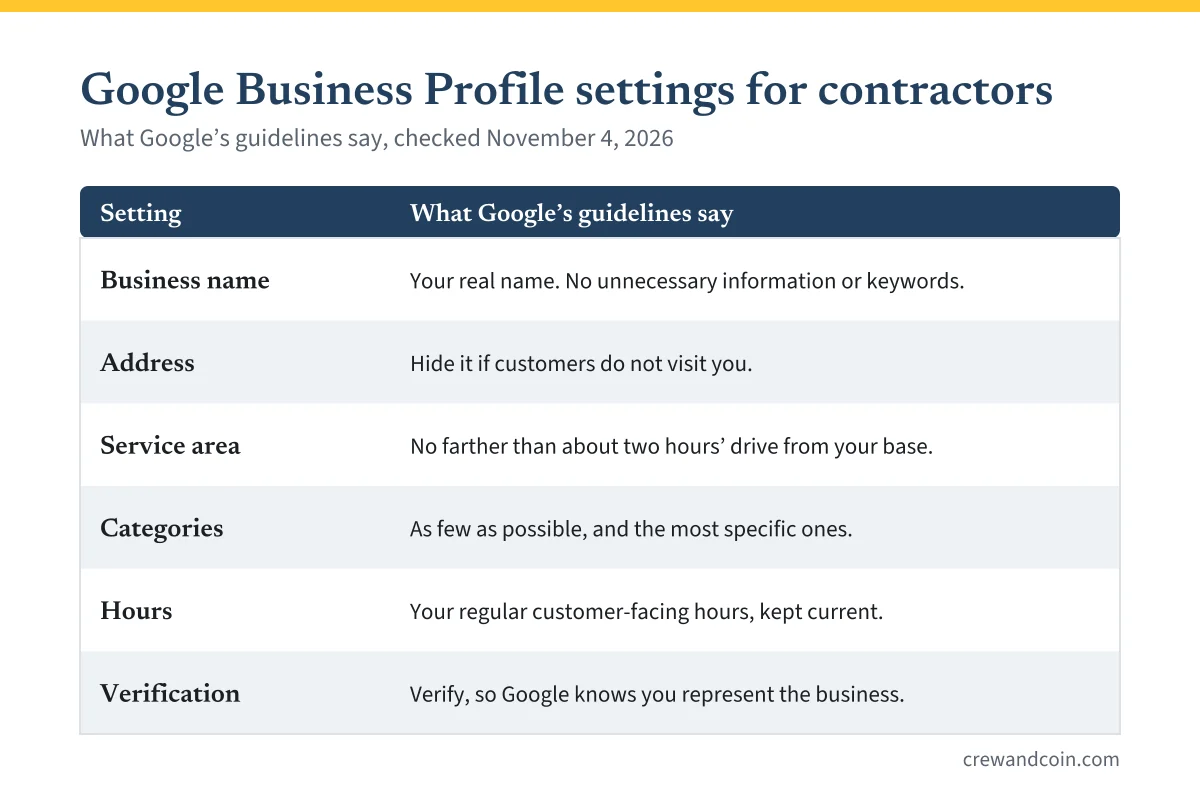
Use your real business name, exactly as it appears on your van, invoices and signage. Google's guidelines say that including unnecessary information in the business name is not permitted. "Smith Painting" is fine; "Smith Painting | Best Cheap Painters Interior Exterior" is the kind of name the guidelines do not allow.
Address and service area
Most trade businesses go to their customers. Google's guidelines say that if you are a service-area business, you should hide your business address from customers. Instead, set a service area. Google says it should not extend farther than about two hours of driving time from where the business is based, although some businesses may justify more.
In practice, set the area you actually want to work in, not the widest one allowed. Long drives eat profit, as the guide to setting a minimum job charge shows.
Categories
Google asks businesses to choose as few categories as possible to describe their core business, from its list, and to pick the most specific ones. A house painter should choose the painting category that fits best, not every home-improvement category available. Add a second or third only if it describes a real, core part of the business.
Hours
Give your regular customer-facing hours, and keep them current, including holidays. Google lists accurate hours among its tips for local ranking. If you take calls outside working hours, the hours should still reflect when customers can actually reach you.
Verification
Google says verifying your business tells it that you are authorized to represent the business, making the profile more likely to show up in results. Do it as soon as the profile is created.
Make the profile complete
Google says businesses with complete and accurate information are more likely to show up in local results. For a trade business, complete means:
- Phone number that someone answers.
- Website, with the same name, phone and service area as the profile.
- Services, listed one by one: "interior painting", "cabinet painting", "deck staining".
- Description in plain words: what you do, where, and what makes you different. No keyword lists.
- Photos. Google recommends adding photos and videos to show customers what you offer. Real before-and-after photos of your work, your van and your crew do more than stock images.
Reviews and replies
Reviews feed prominence, and replying to them is one of Google's own tips. Ask every customer, offer nothing in return, and reply briefly and by name. The rules, and how to ask so people actually do it, are in the guide on how to get more Google reviews.
Mistakes that break Google's guidelines
| Mistake | Why it is a problem |
|---|---|
| Keywords or a tagline in the business name | Google's guidelines do not permit unnecessary information in the name |
| Showing a home address as if customers visit it | Service-area businesses should hide the address, per Google |
| A service area far beyond where you work | Google says it should not extend farther than about two hours' drive |
| Every category on the list | Google asks for as few categories as possible |
| Reviews from staff, friends or paid sources | Google's policy bans conflicts of interest and incentives |
A ten-minute weekly routine
- Reply to every new review.
- Add two or three photos from the week's jobs.
- Check the hours, especially before holidays.
- Note how many calls and website visits the profile sent, so you can compare month to month.
What to do next
Open your profile and check the five settings above against Google's guidelines: name, address and service area, categories, hours and verification. Then add your services and ten real photos. If you are building the rest of your marketing, the guide to getting more customers shows what comes next and when paid channels start to make sense.
Frequently asked questions
Should a contractor show their address on Google Business Profile?
Not if customers do not visit it. Google's guidelines say service-area businesses should hide their business address and set a service area instead.
How big can my service area be on Google?
Google says a service area should not extend farther than about two hours of driving time from where the business is based, although some businesses may justify more.
Can I add keywords to my business name on Google?
No. Google's guidelines say including unnecessary information in the business name is not permitted. Use your real name as it appears on signage and invoices.