Customers
How to get more Google reviews without annoying customers
Quick answer
Ask every customer right after they see the finished work, send your Google review link by text before you leave, and offer nothing in return: Google prohibits incentives for reviews and selectively asking happy customers. Reply to every review briefly and by name.
Picture finishing a job the customer loves. They say thank you twice, maybe offer a coffee. Then you drive away, and the review that would have brought three more customers never gets written. Not because they did not want to, but because nobody asked at the right moment, in a way that took less than a minute.
Reviews are one of the things Google uses to decide how prominent a business is in local results, and they are often what makes someone choose you over the next name on the map. This guide covers the rules you have to follow, how to ask so that customers actually do it, how to reply, and what to do with a bad review. It is part of the guide to getting more customers for a home service business.
The rules first: two sets, and Google's is stricter
Two sets of rules apply to reviews, and following only one of them can get you in trouble with the other.
The FTC's rule. The FTC's Consumer Reviews and Testimonials Rule took effect on October 21, 2024, and courts can impose civil penalties for knowing violations. According to the FTC's own questions and answers, it:
- prohibits writing or creating fake reviews, or buying reviews you know or should know are false;
- prohibits offering incentives that require, expressly or by implication, that a review be positive or negative;
- requires employees and officers who review the business to disclose that relationship;
- prohibits suppressing reviews through intimidation or false accusations about the reviewer;
- allows general requests for reviews sent to all your customers.
Google's policy. Google's rules for reviews go further. Its policy prohibits offering incentives such as payment, discounts or free goods and services in exchange for a review, even if you do not ask for a positive one. It also prohibits discouraging negative reviews, selectively asking only happy customers for reviews, and reviews based on a conflict of interest, such as current or former employees.
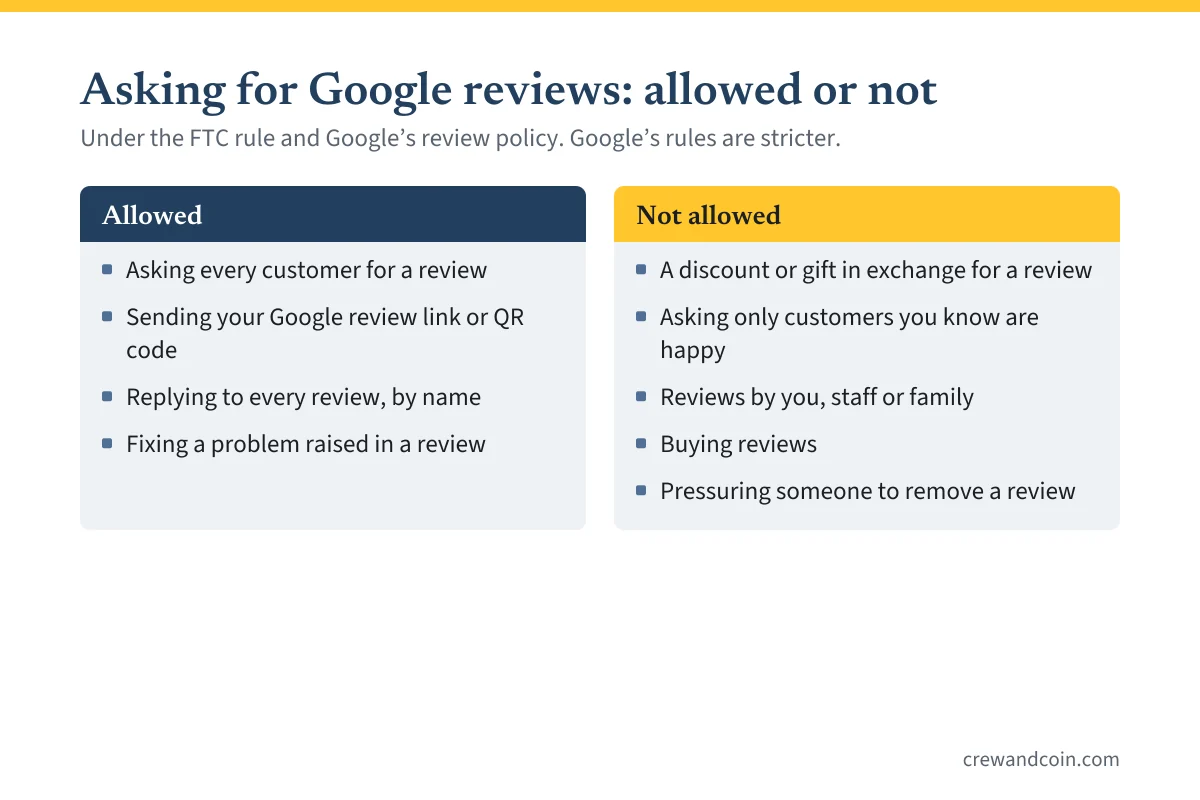
The safe rule that satisfies both: ask every customer, offer nothing in return, and never write or arrange reviews yourself.
How to ask so people actually do it
Ask at the right moment
The best moment is when the customer has just seen the finished work and said something positive. That might be the final walk-through, the moment they see the clean kitchen, or the message where they say thanks. A request two weeks later, by email, competes with everything else in their inbox.
Make it one tap
Google lets you create a link or QR code that takes customers straight to the review form for your Business Profile. Use it everywhere:
- In a text message sent before you leave the driveway.
- On the invoice and the payment receipt.
- On a small card left with the customer.
- In your email signature.
Use simple words
A short script works better than a long explanation:
"Thanks again, I'm glad you're happy with it. Reviews really help a small business like mine. If you have a minute, here's the link. It takes about thirty seconds."
Send the same request to every customer, not only the ones who seemed delighted. That is what both the FTC and Google expect, and it also gives you a more honest picture of how your work is received.
Build it into the routine
Reviews come from habit, not campaigns. Add one line to your job checklist: "Review link sent." If you use field service software, set up an automatic message after the invoice is paid, as long as it goes to every customer.
How to reply to reviews
Google recommends replying to reviews to show customers their feedback matters, keeping replies short and simple, and addressing the reviewer by name. Replies are public, so you are writing for the next customer as much as for this one.
- Positive reviews: thank them by name and mention the job. "Thanks, Maria, it was a pleasure to repaint your kitchen."
- Mixed reviews: thank them, acknowledge the point and say what you have done about it.
- Negative reviews: see below.
Never include private details about the customer or the job in a public reply.
What to do with a bad review
Every business that works long enough gets one. How you respond is what future customers judge. Google suggests being honest, apologizing when appropriate and replying in a timely manner. A practical sequence:
- Wait an hour before you write anything. Replies written while angry read badly.
- Check the facts. Was the customer right about part of it?
- Reply briefly and politely, acknowledge the problem, and offer to sort it out offline with a phone number.
- Fix what can be fixed. A customer may update a review after a problem is resolved, but Google's policy does not allow offering anything in exchange for changing it.
- Never threaten, pressure or make false claims about the reviewer. The FTC's rule prohibits suppressing reviews that way.
What not to do
| Do not | Why |
|---|---|
| Offer a discount or gift for a review | Google prohibits incentives in exchange for reviews |
| Ask only customers you know are happy | Google prohibits selectively soliciting positive reviews |
| Write reviews yourself or ask staff and family to | Fake reviews are banned by the FTC; Google bans conflicts of interest |
| Buy reviews | The FTC's rule prohibits buying reviews you know or should know are false |
| Pressure someone to remove a negative review | The FTC prohibits suppressing reviews through intimidation |
What to do next
Create your review link or QR code from your Business Profile, put it on your invoice template, and send it today to every customer from the last month. If your profile is not complete yet, start with the guide to setting up a Google Business Profile for contractors.
Frequently asked questions
Can I offer a discount for a Google review?
No. Google's policy prohibits offering incentives such as payment, discounts or free services in exchange for a review, even if you do not ask for a positive one.
Can I ask only my happy customers for reviews?
No. Google prohibits selectively soliciting positive reviews. Ask every customer, which the FTC's rule also treats as an acceptable general request.
How should I reply to a negative review?
Google suggests being honest, apologizing when appropriate and replying in a timely manner. Keep it short, offer to sort it out offline, and never pressure the reviewer.